 资讯新闻
资讯新闻 本该止于秋水的寂寞,你的三言两语又起了风

小程序其实窗口动画很受限制,某大佬提到全屏加载动画影响下推动学习的动力,关于动画基础可阅读《uni-app小程序uni.createAnimation动画效果快速上手》
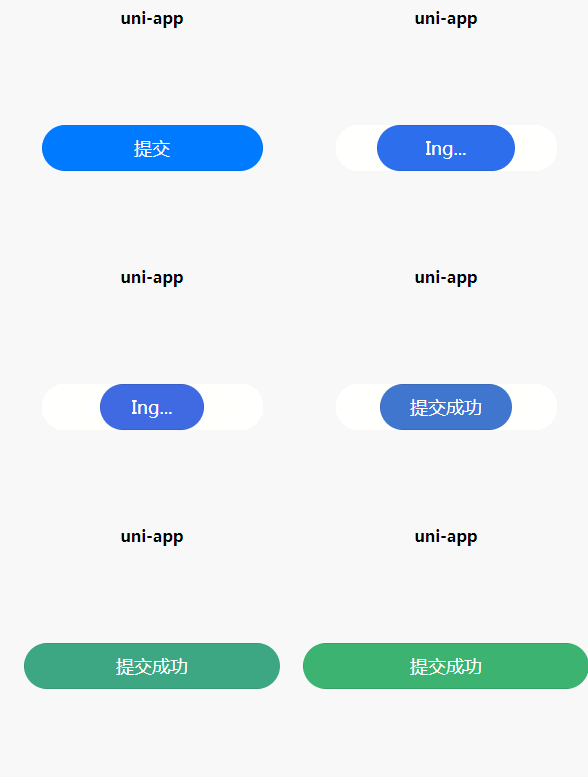
效果
思路
因为本身对js和高难度动画的基础不足,就做了一个简单的效果方便需学习,使用animation加setTimeout实现,思路如下 建立动画效果----按钮点击----触发动画----判断返回参数----执行提交成功或提交失败动画
案例
<template>
<button :animation="animationData" @tap="openTap()" class="fengruiBtn">{{btnText}}</button>
</template>
<script>
export default {
data() {
return {
animationData: {},
btnText: '提交',
codes:200,//模拟返回的状态栏来执行不同的动画
}
},
onShow: function() {
// 初始化一个动画
var animation = uni.createAnimation({
// 动画时间
duration: 800,
// 动画速度
timingFunction: 'ease',
})
// 存在return字段中
this.animation = animation
},
onLoad() {
},
methods: {
openTap() {
// 定义动画内容
this.animation.width(100).backgroundColor('#4169E1').step();
this.btnText = 'Ing...';
// 导出动画数据传递给data层
this.animationData = this.animation.export();
// 定时器等待点击点击动画结束后在执行以下函数
setTimeout(()=> {
if(this.codes == 200){
this.codeSucceed()
}else{
this.codeErr()
}
}, 1000)
},
// 状态成功函数
codeSucceed() {
this.animation.width(286).backgroundColor('#3CB371').step();
this.btnText = '提交成功';
this.animationData = this.animation.export();
},
// 状态失败函数
codeErr() {
this.animation.width(286).backgroundColor('#CD5C5C').step();
this.btnText = '提交失败';
this.animationData = this.animation.export();
},
}
}
</script>
<style>
.fengruiBtn {
margin: 200upx auto;
border-radius: 100upx;
background-color: #007AFF;
width: 520upx;
color: #FFFFFF;
}
</style>