 资讯新闻
资讯新闻 孤独大概就是在深夜,你辗转反侧,拿起手机,解锁,看着满屏的应用,游戏,手指却犹豫不决,不知道该点开那个,最后只能看着屏幕慢慢变暗,看着自己,被黑暗吞噬

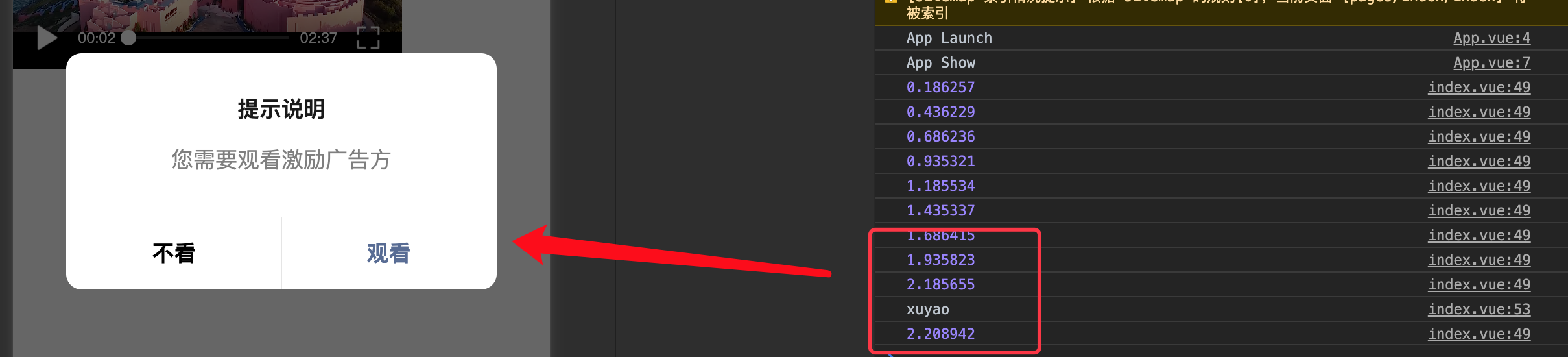
当小程序需要播放一个视频文件在到3分钟后,弹窗需要阅读激励视频广告。观看广告则可以继续播放剩下的内容,不看广告则返回上级页面;每当有一种新发现后它都将有可能出现在星宿UI上;该种模式我相信在某些小程序上已经体验过了,我们看看如何实现
构思
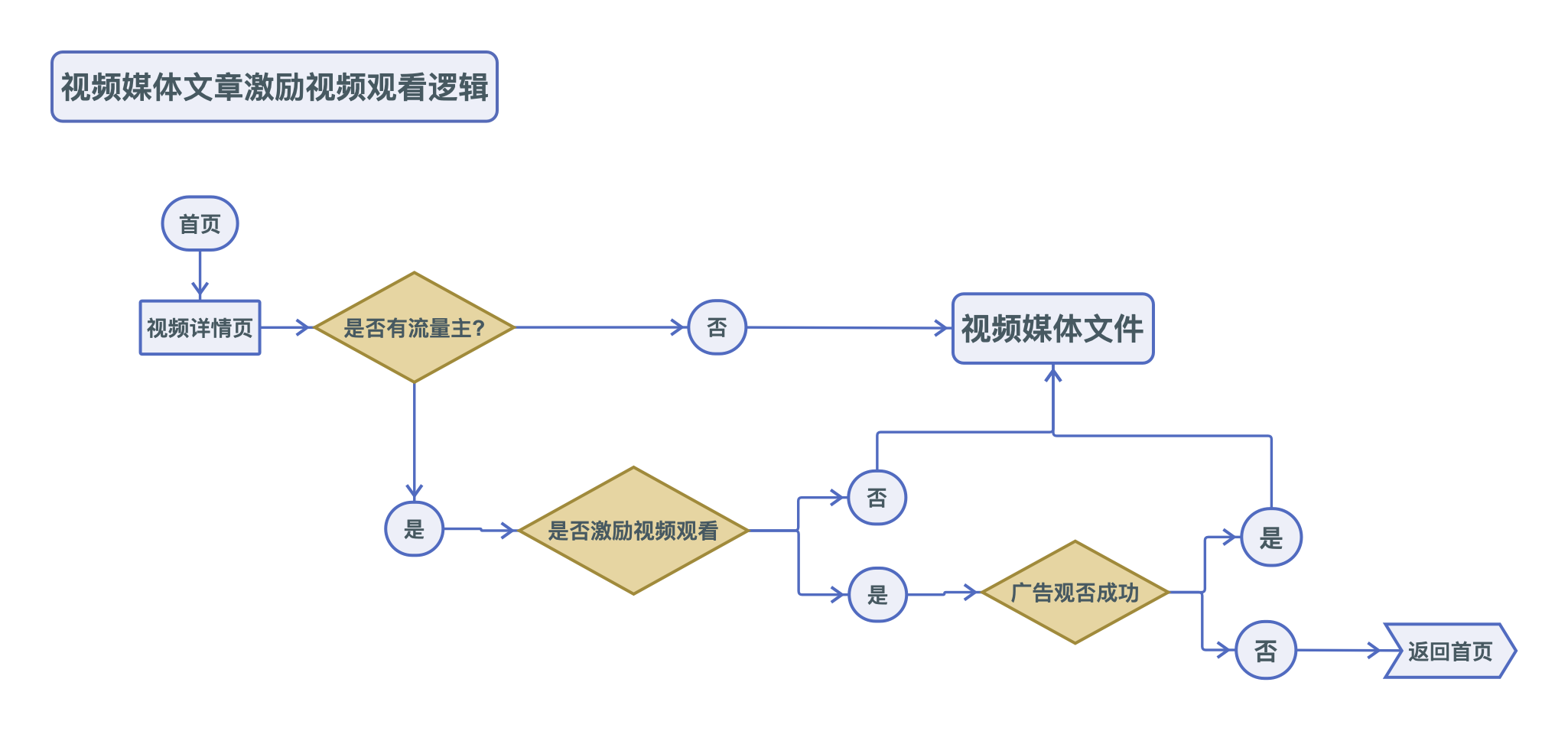
思路相比之前《小程序第一次阅读文章需要激励视频,随后某个时间段内重复可免费阅读》以及《【wordpress】uni-app小程序中访问文章需要输入密码可阅读》会简单很多,流程图如下
思考
在实现该案例中曾遇到以下几个问题,幸运的是微信小程序开发文档中有解决问题的方式
- 如何获取视频播放到第几秒
- 弹窗广告是视频如何自动暂停,广告观看后自动播放
问题1解决:
文档中有@timeupdate属性我们可以添加在video标签中
<video id="frVideo" src="https://cloud.video.taobao.com//play/u/41898112/p/1/e/6/t/1/308829759156.mp4"
        @timeupdate='frVideoTime'></video>
随后执行函数
frVideoTime(e) {
        console.log(e)
 },
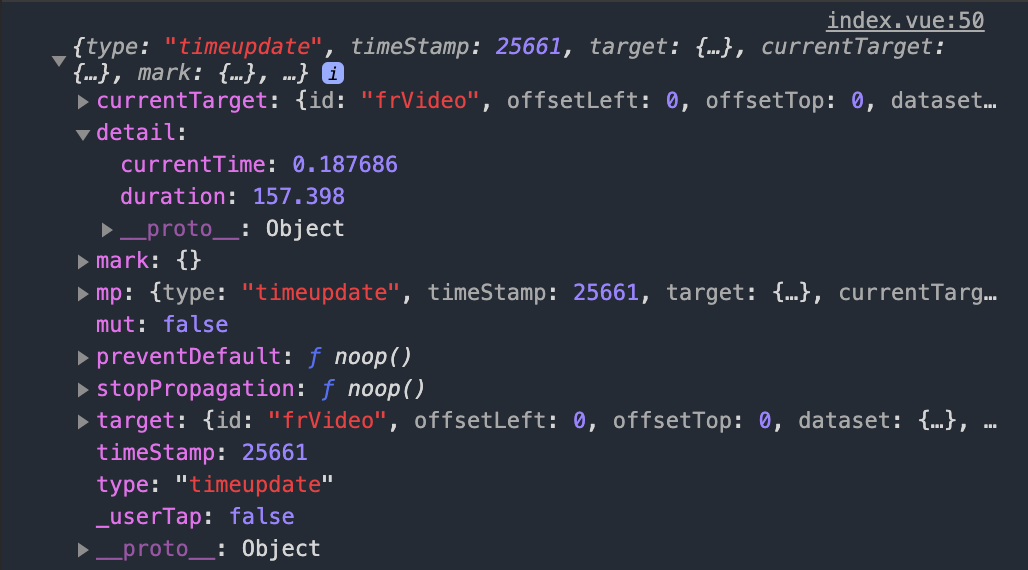
控制台打印中,可以知道detail中currentTime是视频播放进度,duration是视频总长度
问题2解决:
video标签中添加id,在onLoad周期中执行createVideoContext获取节点
this.frVideoId = uni.createVideoContext('frVideo');
随后可使用以下代码控制视频在弹出广告弹窗后自动播放暂停
//暂停
this.frVideoId.pause();
//播放
this.frVideoId.play();
核心代码
核心由frVideoTime函数控制,其中if判断(代码第5行)中的2和3 就是表示在视频播放2秒后触发激励视频广告弹窗
frVideoTime(e) {
console.log(e.detail.currentTime)
// console.log(e)
this.playVideos = e.detail.currentTime;
if (this.playVideos > 2 && this.playVideos < 3 && this.isShowAd) {
console.log('xuyao')
this.frVideoId.pause();
this.adPopup();
this.isShowAd = false
}
},
其他注意
1.测试时请将请求中的视频地址换成自己的
2.该版本为uni-app框架需要hbuilder x编译,
3.请在manifest.json文件中将微信小程序运行配置添加您的小程序id
4.弹窗取消事件请在代码中38行添加,本案例是演示逻辑无上下级界面跳转5.视频播放多少秒出现弹窗在代码51行中if判断中数值2和3控制
案例
<template>
<view class="content">
<view class="fr-video">
<video id="frVideo" src="https://cloud.video.taobao.com//play/u/41898112/p/1/e/6/t/1/308829759156.mp4"
@timeupdate='frVideoTime'>
</video>
</view>
</view>
</template>
<script>
let videoAd = null
export default {
data() {
return {
wxAD: 'adunit-9737fd476e3e42c1',
isShowAd: true
}
},
onLoad() {
// 执行函数
this.getFlowmain();
this.frVideoId = uni.createVideoContext('frVideo');
},
methods: {
//弹窗
adPopup() {
uni.showModal({
title: '提示说明',
content: '您需要观看激励广告方',
cancelText: '不看',
confirmText: '观看',
success: (res) => {
if (res.confirm) {
this.tapAD()
console.log('用户点击确定,触发广告');
} else if (res.cancel) {
// 请添加用户点击取消事件
console.log('用户点击取消');
}
}
});
},
// @timeupdate视频进度变化 获取currentTime视频播放时长 当值大于3秒触发adPopup函数且暂停视频
// 其中if判断(代码第51行)中的2和3 就是表示在视频播放2秒后触发激励视频广告弹窗
frVideoTime(e) {
console.log(e.detail.currentTime)
// console.log(e)
this.playVideos = e.detail.currentTime;
if (this.playVideos > 2 && this.playVideos < 3 && this.isShowAd) {
console.log('xuyao')
this.frVideoId.pause();
this.adPopup();
this.isShowAd = false
}
},
// 广告预加载
getFlowmain() {
if (wx.createRewardedVideoAd) {
videoAd = wx.createRewardedVideoAd({
adUnitId: this.wxAD
})
videoAd.onLoad(() => {})
videoAd.onError((err) => {
uni.showToast({
icon: 'none',
title: "观看失败,请稍后重试"
})
})
}
},
// 点击阅读按钮
tapAD() {
if (videoAd) {
videoAd.show().catch(() => {
// 失败重试
videoAd.load()
.then(() => videoAd.show())
.catch(err => {
console.log('激励视频 广告显示失败')
})
})
videoAd.onError((err) => {
uni.showToast({
icon: 'none',
title: "观看失败,请稍后重试"
})
})
videoAd.onClose((res) => {
if (res && res.isEnded) {
console.log('广告成功')
this.frVideoId.play();
} else {
uni.showToast({
icon: 'none',
title: "中途关闭广告"
})
}
})
}
},
}
}
</script>
<style>
.fr-video {
width: 100%;
height: 300rpx;
}
</style>
案例下载
https://yinfengrui.lanzous.com/i2oG6oxh62h